
How to close 0DTE options at a set time at Interactive Brokers
Plenty of 0DTE traders have a hard rule about time: be flat by noon, out before the 2:00 PM Fed announcement, or flat by 3:45 PM whatever the trade is doing. The late-day version is the most common. The last fifteen minutes are when a short strike near the money can swing from a full winner to a full loss, and when the bid/ask on a four-leg spread is at its widest.
Interactive Brokers can do this for you with a conditional order. It works, and it has four catches that matter more on expiry day than on any other. The last section shows the same exit as a rule you write once and never rebuild. The examples use 3:45 PM; the same steps work for any time.
What time do SPX, XSP, SPY and QQQ options stop trading on expiration day?
Expiring SPX (SPXW) and XSP options stop trading at 4:00 PM ET. Expiring SPY and QQQ options trade until 4:15 PM ET. On a half day, SPXW stops at 1:00 PM ET. Your exit has to land before that time.
| Product | Expiring series stop trading | On a half day |
|---|---|---|
| SPX (SPXW weeklys and dailies) | 4:00 PM ET | 1:00 PM ET |
| XSP | 4:00 PM ET (3:00 PM Chicago) | earlier, when the market closes early |
| SPY, QQQ | 4:15 PM ET | earlier, when the market closes early |
Source: Cboe's SPX and XSP specifications and its extended trading hours FAQ.
SPX and XSP are cash-settled and European-style, so a position you still hold at the bell settles to cash and nobody can assign you. SPY and QQQ options are American-style and settle into shares. Holders can still exercise after trading stops, so a short option that finished just out of the money can be assigned overnight on an after-hours move. That alone is reason enough to be flat in SPY and QQQ before the close.
Closing at a set time with a conditional order in TWS
IBKR's conditional orders let you attach conditions to an order, and the order is submitted only once they are all true. Time is one of the condition types, next to price, volume, margin cushion and daily P&L.
To close a spread at 3:45 PM:
- Right-click the spread and choose Trade > Order Ticket. Conditions live only on this full ticket; the compact Order Entry panel that TWS opens by default has no place for them. Set the same legs and quantities as the open position, with the opposite action.
- On the ticket's Conditional tab, click Add, choose Time, and set it to after 15:45 ET on today's date. If you cannot see the tab, click the arrow to the right of the last tab.
- Leave the ticket set to submit the order when the condition is met, choose the order type and price you want submitted at that moment, then Transmit.
If the closing order is already working, you can add the condition to it instead: right-click its row in the Activity panel and choose Modify > Condition.
The order shows as held and monitored. IBKR simulates conditional orders on its own side, so it does not need TWS to stay open. Conditional orders are a TWS feature.
If you run your own code, the TWS API exposes the same thing as a
TimeCondition attached to the order.
Where it breaks for 0DTE
You build it by hand, for every trade
Count the steps above: open the full ticket, rebuild every leg of the spread with the opposite action, add the condition, set a price, and (see below) tie it to your stop. That is a minute or two of careful clicking, and it has to happen right after you are filled, while you should be watching a position that can move a long way in a minute. One wrong strike or quantity and the order closes a different spread from the one you hold.
None of it carries over. The condition holds a full date as well as a time
(the API writes it as 20260914 15:45:00 US/Eastern), so it covers one
session. Tomorrow's position needs a new order built from scratch, and a day
with four positions means four of them.
The order does not know about your position
A conditional order is an ordinary order with a trigger in front of it. It names a contract, a side and a quantity. It does not refer to the position it was meant to close.
Say your stop takes you out of the spread at 2:10 PM. The 3:45 order is still working, and at 3:45 IBKR submits it: a sell of a spread you no longer hold. In an account that can sell spreads, that opens a fresh short position fifteen minutes before expiry, and nobody is watching it because you thought you were flat.
The same happens in a smaller way when you close one leg by hand or roll it. The combo on the time order no longer matches what you hold.
You can guard against this by putting the stop and the time exit in one One-Cancels-All group, so that a fill on either cancels the other. Before you walk away, check in TWS that both orders really carry the same group.
The price is decided in the morning
When the condition comes true, IBKR submits the order exactly as you wrote it. In IBKR's own example, the condition triggers and "a Limit order for 1 XYZ option contract is submitted with a Limit price of 30.95", which is the price typed in when the order was created.
On an expiry-day spread that leaves two bad choices:
- A market order fills a four-leg SPX combo at whatever the four bid/ask spreads add up to at 3:45, which is usually the worst they have been all day.
- A limit order set at 10:00 AM may be nowhere near the market by 3:45. If it does not fill, you are still in the position at the close, which is the thing the order was there to prevent.
A clock time misses the close on half days
On the half days around holidays, SPXW stops trading at 1:00 PM ET. An order waiting for 3:45 PM never gets its chance, and the position goes into settlement. A fixed clock time cannot know the market closed early. A noon exit survives a half day; anything set for the afternoon does not.
What a rule-based exit does instead
VolNinja is an app that runs on your own machine and trades through your own IBKR account. In it, a time exit is a rule on the position rather than an order sitting at the broker. You describe the outcome, and the rule acts on the position as it stands when the time comes:
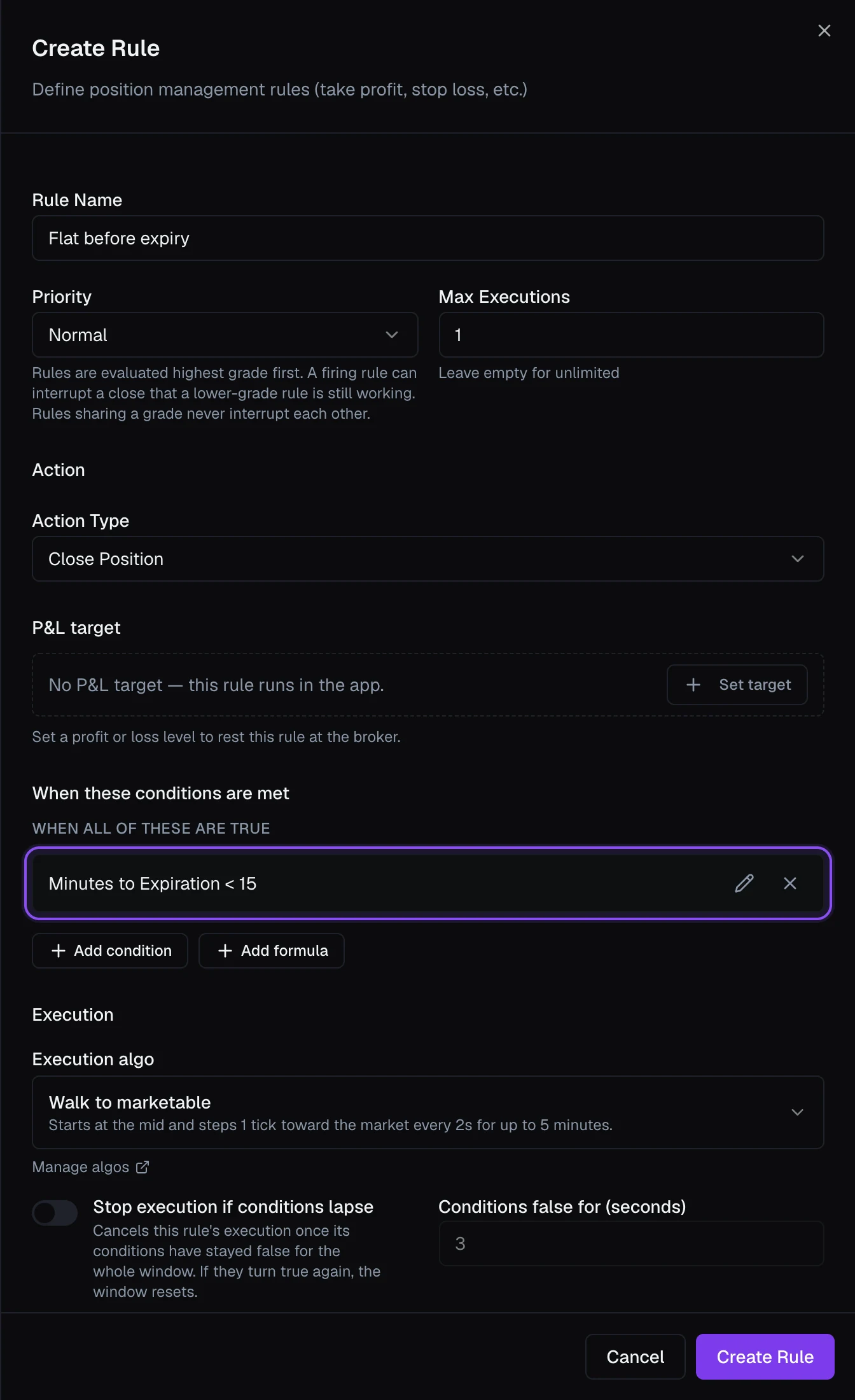
- If a stop already took the position off, the rule has nothing to close. If you closed a leg by hand, it closes the legs that are left.
- A rule on Current Time handles a fixed clock exit, such as Current Time is after 12:00, every day without a date. For an exit tied to expiry, the Minutes to Expiration field counts down to the moment the position's own options stop trading, half days included. Minutes to Expiration is less than 15 fires at 3:45 PM on an SPX 0DTE, at 12:45 PM on a half day, and at 4:00 PM on SPY, whose options trade until 4:15. A position that expires tomorrow is left alone today.
- The close goes out with an execution algo chosen on the rule. Walk to marketable, for example, starts at the mid and steps a tick toward the market every two seconds, so the price is set by the market at 3:45 rather than by you at 10:00 AM.
- Put the rule on a template and every position the template opens carries it from its first minute. Nothing to rebuild each morning.
The trade-off: VolNinja sends a time exit's closing order only when 3:45 arrives. Until then nothing sits at IBKR, so if VolNinja is not running at 3:45, nothing closes the position.
A stop-loss rule with a loss level works differently. VolNinja places it at IBKR as a resting order as soon as the position opens, and it stays there whether or not VolNinja is running. Pair the two: with VolNinja up, the time exit closes the position at 3:45, and with your machine off, the stop at the broker still protects you. Only one of them can ever close the position.
The guide covers each piece: Rules and conditions, the Minutes to Expiration field, where a rule runs, and management rules on a template.