
Execution Algos
An execution algo is how VolNinja works an order into the market: where it starts the price, whether it chases, how long it keeps trying, and what it does if it runs out of patience. The same algo model is used everywhere an order is sent — opening a trade, a rule closing one, a close you click yourself, a roll — so it's explained once here, and the other articles point at it.
You pick an algo by name rather than filling in fields each time. VolNinja ships a handful of built-in algos that cover most trading, and you can save your own to the library and reuse them.
Where you choose one
- On a template, as the Entry execution algo — how every position it opens gets filled. See Entry execution.
- On any rule that closes, as the Execution algo on the action. See Management rules and Automating a position.
- When you close by hand, from the Close with algo menu on a position. See Opening & closing positions.
- On a roll, for the order that reopens the leg. See Rolling a leg.
- In a strategy's actions, for anything it opens or closes on your behalf.
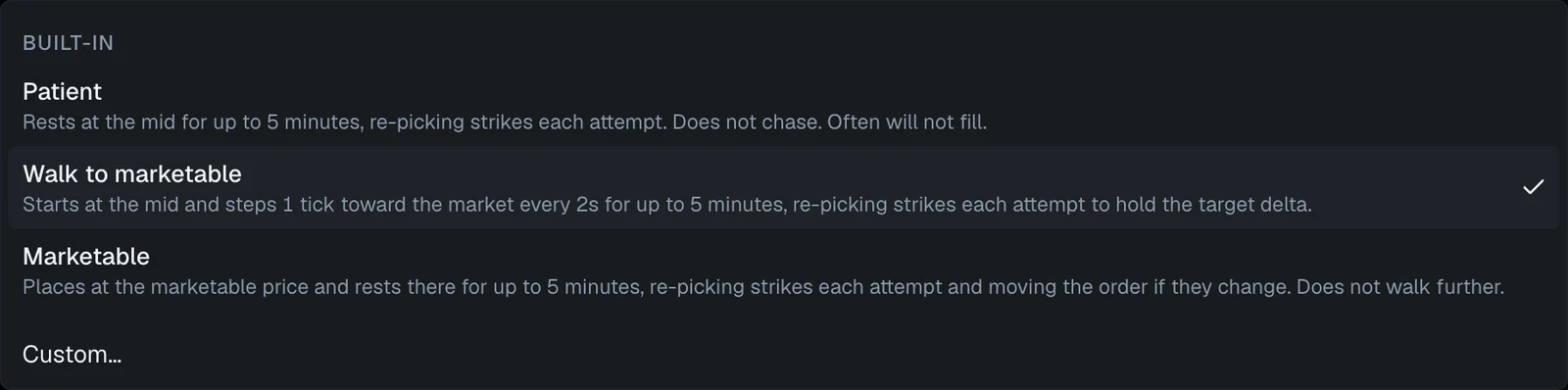
The picker groups its options under Built-in, Saved algos, and — once you've made one for this action — This action only, and offers Custom… at the bottom to build your own on the spot. Each option carries its own description, and a tick marks the one in force.
The built-in algos
For closing:
| Algo | What it does |
|---|---|
| Market | Sends a market order: fills at once at whatever the book offers, with no price control. Outside regular hours, where market orders are not accepted, it instead works a limit from the marketable price up to 9 ticks through it, and gives up after 30 seconds. |
| Walk to marketable | Starts at the mid and steps 1 tick toward the market every 2s for up to 5 minutes. |
| Urgent | Starts marketable and steps 1 tick every 2s, may cross the spread, and becomes a market order after 20 tries — about 40 seconds. For stop-losses. |
| Rest at mid | Rests at the mid it starts from and never chases the market, giving up after 10 tries — about 50 seconds. A rule that still holds then fires again at the new mid. Often will not fill — that is the point. |
For opening:
| Algo | What it does |
|---|---|
| Patient | Rests at the mid for up to 5 minutes, re-picking strikes each attempt. Does not chase. Often will not fill. |
| Walk to marketable | Starts at the mid and steps 1 tick toward the market every 2s for up to 5 minutes, re-picking strikes each attempt to hold the target delta. |
| Marketable | Places at the marketable price and rests there for up to 5 minutes, re-picking strikes each attempt and moving the order if they change. Does not walk further. |
Tip
The choice is a trade between price and certainty, and it should follow the intent of the order. A stop-loss you want filled — Urgent, or Market. A profit target you're happy to miss — Rest at mid or Patient. Anything in between — Walk to marketable, which is the default entry algo on a new template. A new rule starts on Market for its exit; change it when you want a worked fill instead.
What the settings mean
Every algo has a Kind (Entry or Exit) and a Type. The type is shown as a badge, not something you pick: an algo you create is always a limit algo, and everything below describes one. Market is the type of the built-in Market algo, and nothing else — sending an order straight to the market is one behavior with one setting, so a second copy of it would only be the built-in under another name.
- Market — send a market order. Its only setting is Fill wait (seconds) — how long VolNinja waits for the fill to come back before treating it as a problem — fixed at 30 seconds on the built-in.
Important
Outside regular trading hours, Market does not send a market order. The exchange accepts none in extended or curb sessions, so VolNinja substitutes a bounded urgent walk instead: a limit that starts at the touch and steps up to 9 ticks through it, a step every 3 seconds, within the fill wait you set. It is still the most aggressive algo available, but it is not instant, and outside hours it can finish without a fill. If an overnight or pre-open exit has to happen, watch it rather than assuming it filled.
- limit — place a limit order and work it. This is what you get when you create an algo, and everything below applies to it.
Where the price starts
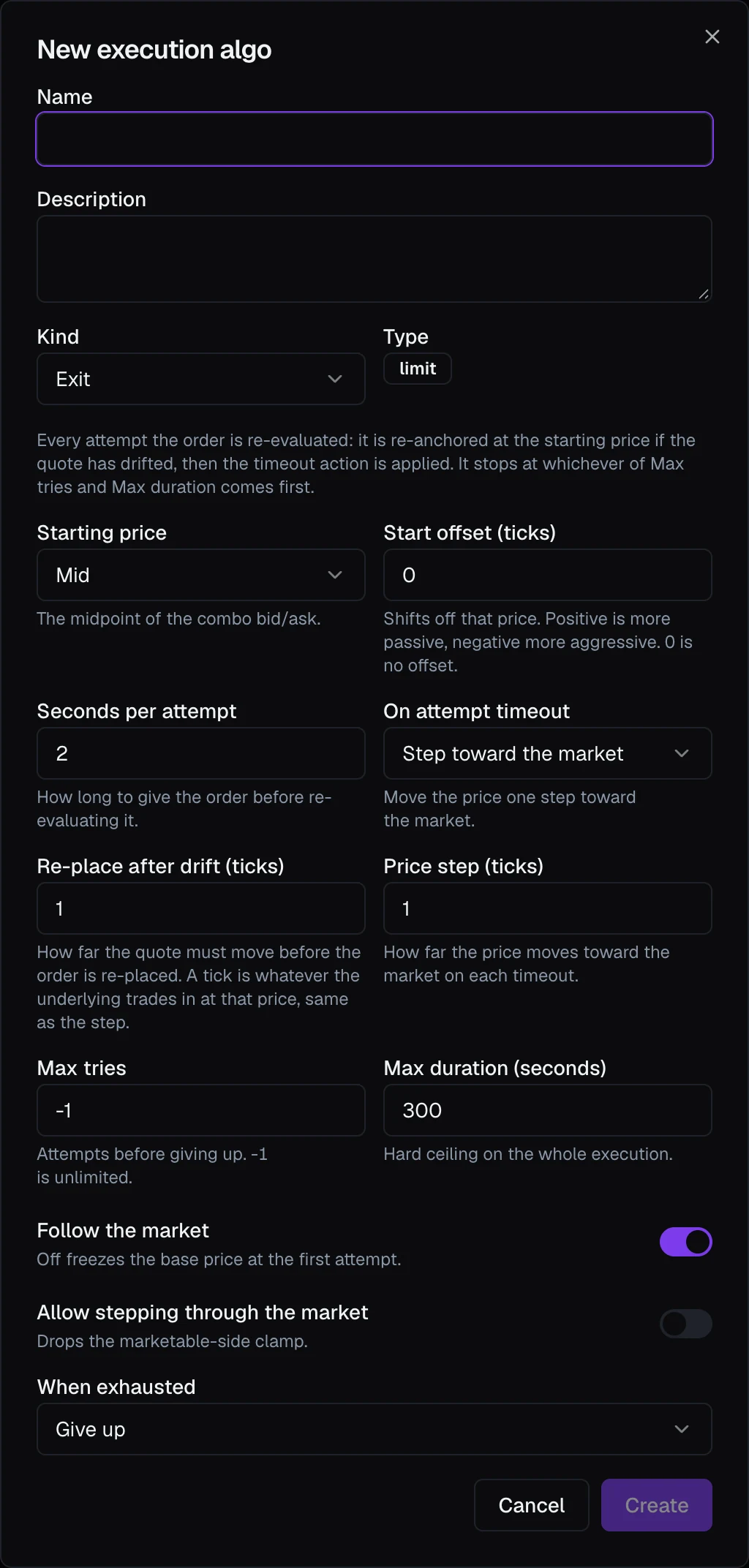
- Starting price — Mid (the midpoint of the combo bid/ask), Passive (sell at the ask, buy at the bid: a better price, slower or no fill), or Aggressive (sell at the bid, buy at the ask: marketable, fills quickly at a worse price).
- Start offset (ticks) — nudges that starting point, in ticks of the contract.
How it retries
- Seconds per attempt — the cadence. Every attempt, VolNinja re-checks the market and applies the timeout action below.
- On attempt timeout — Step toward the market moves the price one step closer to a fill each time; Hold the price leaves it where it is and simply waits.
- Price step (ticks) — how far each step moves, when stepping.
- Re-place after drift (ticks) — how far the market must move before the order is re-anchored. It stops the order being re-priced on every small tick, and a move that leaves the order's price unchanged never re-places it.
- Follow the market — keep re-anchoring to the moving market rather than to the price the order started at.
- Allow stepping through the market — permit the price to cross the spread rather than stopping at it. This is what makes Urgent urgent.
When it stops
- Max tries and Max duration (seconds) — two independent ceilings; whichever is reached first ends the loop.
-1max tries means unlimited, leaving max duration as the only stop. - When exhausted — Give up leaves the position as it is and reports the attempt, or Escalate to a market order takes the fill at whatever the market offers.
Entry algos add Lock strikes after the first attempt: off, VolNinja re-picks the strikes each attempt using the leg selectors so they track the market; on, it keeps the first attempt's strikes and moves only the price.
Saving your own
Anywhere you pick an algo you can choose Custom… and build one inline, in the Custom exit execution (or Custom entry execution) dialog. As the dialog says, a custom algo works a limit order — to close at market, use the built-in Market instead. A new exit algo starts with the settings of Walk to marketable, and a new entry algo with those of Patient, so you change only what you want different.
One checkbox, Save to library, decides how widely it applies:
- Unchecked — a one-off that belongs to this one action. It appears in that action's picker under This action only, with a pencil button beside the picker to edit it later. An action has at most one: once it has one, Custom… becomes Edit "…".
- Checked — it becomes a Saved algo, available to every rule and template.
This works the same on a template's rules, on a position's own rules, and on a strategy's Close positions action. On a position or strategy rule the picker labels the one-off Kept with this rule: it lives with that rule and goes away with it. On a template that hasn't been saved yet it reads Not saved yet — created with the template until you save.
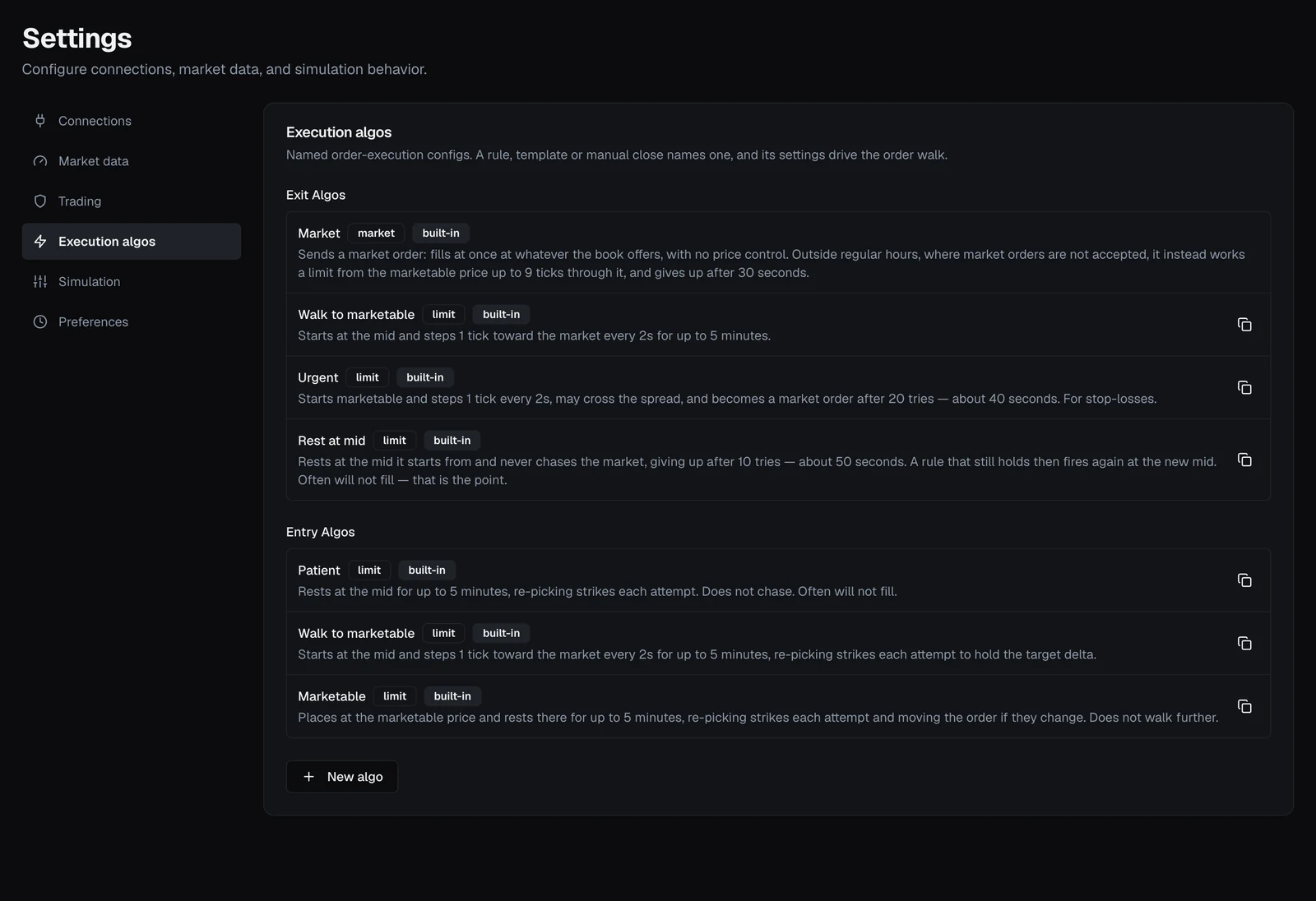
Saved algos are managed in Settings → Execution algos, which lists them under Exit Algos and Entry Algos. New algo creates one; each limit algo has a duplicate button, which is how you make an editable copy of a built-in; your own can be edited or deleted there. Built-ins are marked built-in and can't be changed in place. Market has no duplicate button, because a copy of it could only be itself.
Important
Editing a saved algo changes live behavior — every rule and template that names it uses the new settings the next time it sends an order. VolNinja asks you to confirm before saving for that reason. If you want to try something out, duplicate the algo and edit the copy.
How an algo relates to your rules
A rule decides when to act; the algo decides how the resulting order is worked. The two are independent, and a rule that rests at your broker uses both:
- While VolNinja is running, it handles a triggered exit itself and works the order with your chosen algo, which may get a better fill than a plain market order.
- The order resting at Interactive Brokers is the backstop underneath that, and it doesn't use an algo — it's a plain stop or limit that the broker executes on its own if the app isn't there to work it.
So the algo is what you get when the app is alive, and the resting order is what you get when it isn't. See Where rules run.
Warning
An algo's job is to get an order filled, and in LIVE mode that spends real money. Urgent and Market in particular will cross the spread or take whatever the book offers. Try an unfamiliar algo in Paper first: see Paper vs live.