
Strategies Overview
A strategy is a set of rules that runs continuously and acts on its own, deciding when to open trades and managing your book while it does. If a template is the blueprint for a single trade, a strategy is what puts those trades on for you: it watches the market and your positions and, when its conditions are met, takes an action, usually opening a template. In the app's own words, a strategy groups rules and owns the trades they open.
That splits VolNinja's automation in two:
- A template defines what a trade is and how it manages itself once open (its legs and rules).
- A strategy decides when and whether to open trades across your whole book, automatically.
New to strategies? Running a Strategy builds one from scratch, step by step. This page is the tour.
The Strategies page
Open Automation → Strategies from the top navigation. The page has a New Strategy button and three tabs:
- Strategies — your list of strategies.
- Global Variables — values shared across strategies; see Strategy Variables.
- Event Log — every rule firing across all your strategies, for the trading mode you're viewing; see Monitoring a Strategy.

Reading a strategy card
Each strategy shows as a card:
- Name and its priority grade (Critical, High, Normal, or Low). Click either to open the strategy.
- Paper and Live switches — turn the strategy on or off for each account, independently. These act immediately.
- Edit (pencil) and Delete (trash).
- The strategy's description, if it has one.
Deleting asks you to confirm. As the dialog notes, it removes the strategy and all its rules, but open trades keep running under their per-trade template rules.
Turning a strategy on — Paper and Live are separate
A strategy isn't running until you switch it on, and it runs per account. Flipping Paper starts it against your paper account; flipping Live starts it against your real one. The two are independent, so you can prove a strategy out in paper for as long as you like before it ever touches real money.
Warning
Turning on the Live switch lets the strategy open and manage real trades on its own, with real money, whenever its conditions are met, with no further confirmation. Always run a new strategy in Paper first and watch what it does. See Paper vs live.
Inside a strategy
New Strategy, or a strategy's name or pencil, opens the strategy sheet (New Strategy or Edit Strategy). One sheet holds everything, top to bottom:
- Basic Information — the Name, a Priority grade, an optional Description, and the Enabled switches for Paper and Live.
- Private variables — values this strategy keeps for itself; see Strategy Variables.
- Aggregates — live numbers computed over your positions; see Strategy Variables.
- Rules — the conditions and actions that drive the strategy; see Strategy Rules.
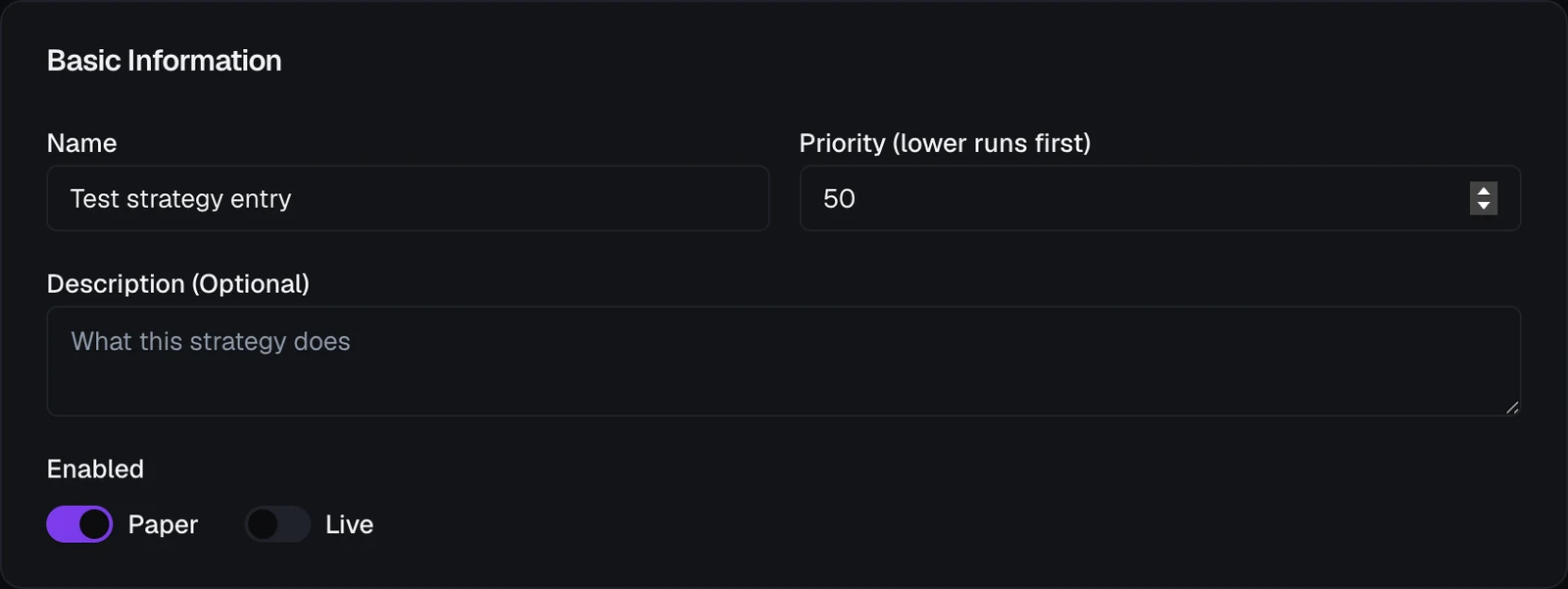
Global variables aren't in the sheet; they live on their own tab because every strategy shares them.
Saving is all at once
Everything you do in the sheet, including adding, editing, pausing, or deleting rules and variables, is a draft until you click Save strategy at the bottom. Nothing reaches the running strategy before that. Close the sheet with unsaved changes and VolNinja asks Discard changes? first, so you can't lose work by accident.
Save checks that every my.* variable a rule uses actually exists. If one doesn't (a typo, or a variable you just deleted), the save is refused with an Undeclared variables message naming it. Declare the variable or remove the reference, then save again.
How strategies orchestrate templates
The link between the two layers is a strategy's actions. A strategy rule's action can execute a template: the strategy decides the moment to enter, and the template supplies the trade and everything that manages it afterward. You can point one strategy at several templates and let its rules choose which to open, so one strategy can run a whole playbook of setups. See Templates Overview for the trade side.
When a strategy opens a trade, the new position takes its own copy of the template's rules at that moment. From then on it manages itself with those rules, so pausing, editing, or deleting the strategy later doesn't change how its open trades are managed.
Priority
When more than one strategy could act at the same moment, priority sets the order. You pick a grade (Critical, High, Normal, or Low) in the strategy's Basic Information; the highest grade is checked first and, within a grade, strategies run in name order. A grade decides order only; it never interrupts an action another strategy already has in progress. Rules inside a strategy are ordered the same way (see Strategy Rules).
Watching them run
A running strategy works in the background. Two places show what it has been doing:
- Your Dashboard's Strategies card lists your strategies with a run switch for the current mode; click one to open its live runtime view.
- The Event Log tab shows every rule firing, why it fired, and how it turned out.
Both follow the trading mode you're viewing. For the runtime view and the event feed in detail, see Monitoring a Strategy.