
Rolling a Leg
Rolling moves one leg of a position to a different strike without closing the whole trade: VolNinja buys back the leg where it is and reopens it at a new strike, in a single order. It's how you re-center a tested short, chase a delta target, or take in more credit while keeping the rest of the position on.
You can roll a leg two ways: by hand from an open position, or automatically as a management rule that fires on conditions you set. Both run the same operation underneath.
Important
Rolling today is a vertical roll: the new leg keeps the same expiration and only the strike changes. Rolling out to a later expiry isn't available yet.
Roll a leg by hand
A roll starts from the position that holds the leg. Open the position to bring up its Details sheet (see Position details), go to the Overview tab, and find the leg in the Legs card. Open that leg's ⋯ menu, which for an open leg lists Roll Leg… above the red close actions, and choose it to open the Roll Leg dialog.
The dialog's subtitle restates the leg you're about to roll (its action, size, right, current strike, and expiry), so you can confirm you picked the right one.
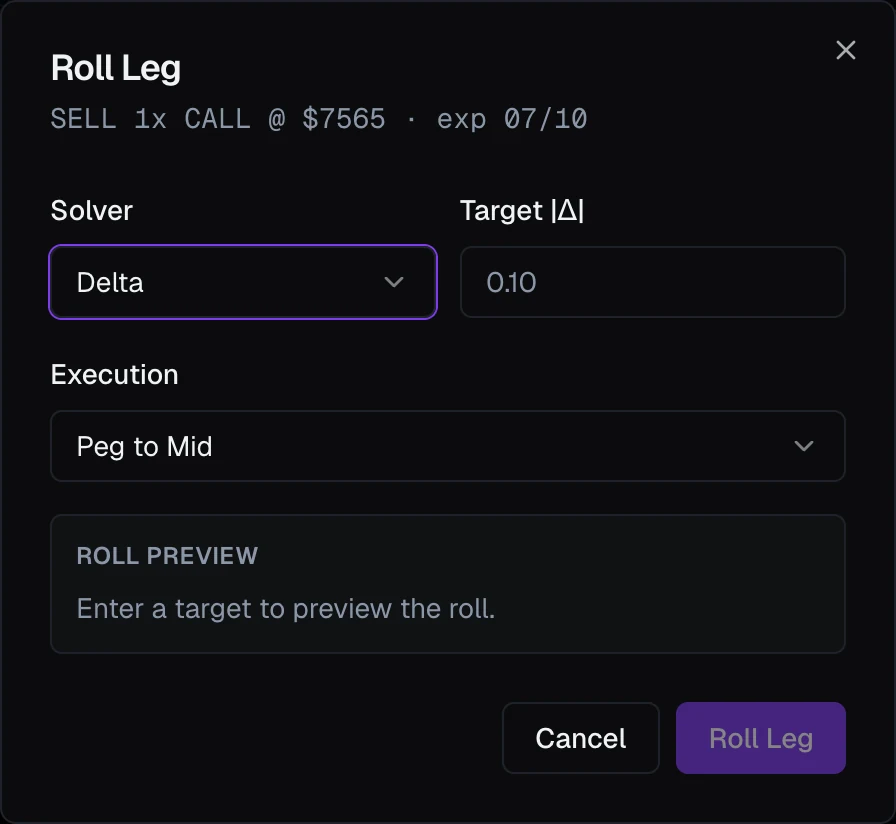
Pick the new strike — the Solver
The Solver decides how VolNinja chooses the strike to roll into. Pick the one that matches how you think about the trade:
- Delta — enter a Target |Δ| (e.g.
0.10); VolNinja rolls to the strike whose delta is closest. - Premium — enter a Target premium $; a Price Reference (Mid / Bid / Ask) appears so you can say which quote to match.
- Strike — name the exact Target strike you want.
- Offset — enter Points from current strike (e.g.
+25), measured from where the leg sits now.
Choose how it executes
Execution sets how the roll order is worked. It starts on Peg to mid (default walk), a limit order that starts at the mid and walks toward the market. Choose Market for an immediate fill, or any of your limit-based execution algos (Walk to marketable, Urgent, Rest at mid, and any you've saved). A worked roll shows a progress view while it runs.
Read the Roll Preview
As you enter a target, the Roll Preview panel fills in with the candidate strike, its live bid / mid / ask and delta, and the economics of the roll:
Close ≈ … → Open ≈ … · Net ≈ … credit / debit
Before you commit, that line tells you whether the roll takes in credit or costs a debit. An Estimate badge means the target strike isn't in the live quote set yet, so VolNinja re-selects the final strike against live data when the roll runs.
When it looks right, press Roll Leg to send it. VolNinja closes the old leg and opens the new one together; afterward the old leg is marked R (rolled) and the position's number of rolls ticks up, both visible in Position details. The rest of the position is untouched.
Roll a leg automatically
The same operation is available as a rule action, so a roll can fire on its own, for example rolling a short leg back to 0.10 delta if the underlying runs past it. Add it wherever you build rules: on a template so every position it opens inherits it (see Management rules), or on a single open position after the fact (see Automating a position).
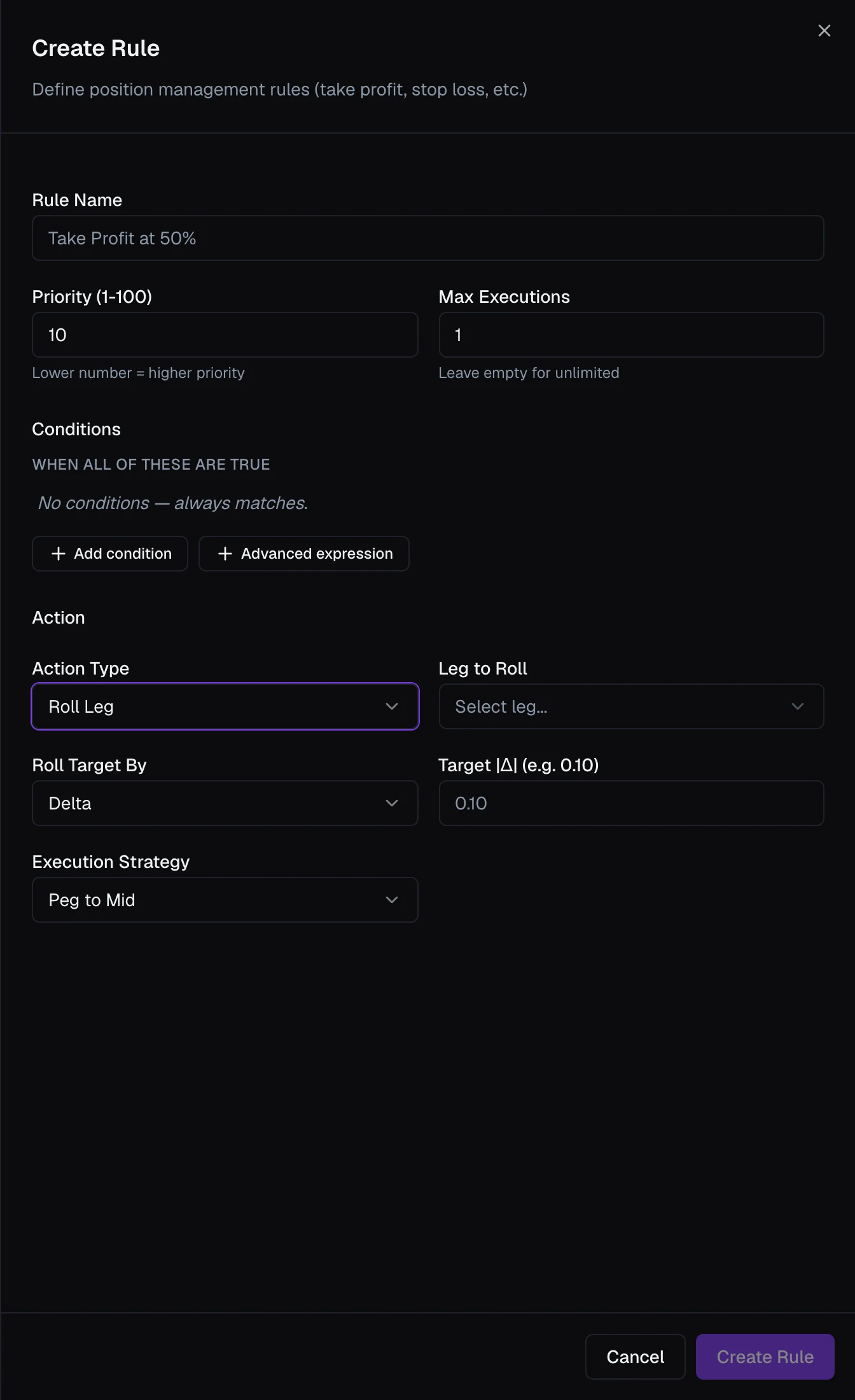
In the rule editor, set Action Type → Roll Leg. The roll-specific fields appear:
-
Leg to Roll — which of the template's combo legs to roll.
-
Roll Target By — Delta / Premium / Strike / Strike Offset, the same four solvers as the manual dialog.
-
Target — the value for that solver (its label changes to match: Target |Δ|, Target Premium $, Target Strike, or Points From Current Strike).
-
Premium Price — Mid / Bid / Ask, shown only for the Premium solver. Below them, the Execution section sets how the roll order is worked:
-
Execution algo — a new rule starts on Market; pick a limit-based algo to work the roll for a better price. See Execution algos.
-
Stop execution if conditions lapse and Conditions false for (seconds) — cancel a roll that is still being worked once the rule's conditions have stayed false for that long. They only apply to a limit algo, so they stay greyed out while the algo is Market, which fills or doesn't in one order.
The conditions that decide when the roll fires work like they do in any other rule; see Rules & conditions.
How a roll works with standing orders
If the leg you're rolling is protected by rules standing at your broker, VolNinja clears the ones the roll would invalidate (the leg's own orders plus any whole-position orders) before it places the roll, then restores protection once the new leg is in place. It won't pull a stop that is about to fire: if a conflicting order is close to triggering, VolNinja refuses the roll and tells you why, rather than stripping protection first.
Warning
In LIVE mode a roll places real orders, closing and reopening against your real account. Rehearse rolls in Paper first, and never submit test orders while you are in live mode. See Paper vs live.
Related
- Opening & closing positions — closing a single leg outright, the other action on the leg's ⋯ menu.
- Position details — where a rolled leg shows as R and the roll count and history live.
- Management rules — the full set of rule actions a roll sits alongside.