
Market Data & Subscriptions
VolNinja runs on live prices: to draw the options chain, value your positions, and evaluate your rules. Streaming quotes are a limited resource at your broker, so VolNinja is deliberate about what it streams and when, and it keeps that spending inside your Interactive Brokers data-line budget.
Two kinds of market data
VolNinja pulls prices two ways, and the difference is what keeps you inside your budget:
- Snapshots — a lightweight sweep across the chain, refreshed roughly every 15 seconds. Snapshots feed the options chain and the analytics, and they do not consume live data lines, so a wide range of strikes stays visible for free.
- Live subscriptions — tick-by-tick streaming quotes for the strikes that matter right now. These do consume data lines, and they're what the options chain's Status column marks as Live.
When an underlying's chain is active
VolNinja doesn't watch every option chain all the time. An underlying's chain for the day is active only while something needs it:
- a favorited template on that underlying, or one an enabled strategy can open,
- an open position (or one still filling or closing) with legs in it, or
- Always stream option chains switched on for it in Settings (see Live coverage).
While none of these holds, the chain is idle: VolNinja requests no quotes for it, live or snapshot, and it costs nothing. The options chain for that underlying says No live option data and tells you why. As soon as you favorite a template on it, enable a strategy that opens one, or open a position, the chain comes back on its own.
What VolNinja keeps live
For each active chain, within your line budget, VolNinja streams the things that need fresh quotes and lets everything else ride on snapshots:
- Your open positions and working orders — always, so P&L and rules act on live prices.
- The at-the-money band — the strikes around the current spot (±2 by default).
- Out-of-the-money strikes beyond that band — as many as your remaining budget allows, on any underlying with Keep hot OTM bands switched on, reaching further on the put side than the call side.
- Anchor delta strikes — the specific per-wing deltas you trade (say 0.10, 0.16, 0.30), kept live so strike selection uses real quotes.
- A warm band during entry — while a template is opening a trade, VolNinja streams a few strikes around the target so re-selection has fresh prices.
As the market moves and you open or close trades, VolNinja shifts this live coverage automatically; you rarely manage it by hand. The Options Chain Status column shows which strikes are live at any moment.
Your data-line budget
Every Interactive Brokers account can stream a limited number of live quotes at once, 100 by default. VolNinja shows your current usage in System Status (the status dropdown at the top of the app) as an "N/your-limit subs" badge.
A full budget is normal and healthy. VolNinja deliberately spends spare lines on extra live coverage, so the count often sits at or near your limit, and the badge stays neutral however high it goes. Whether live data is actually under pressure is shown by the Data pill beside it; see System Status and data health.
Tuning coverage in Settings
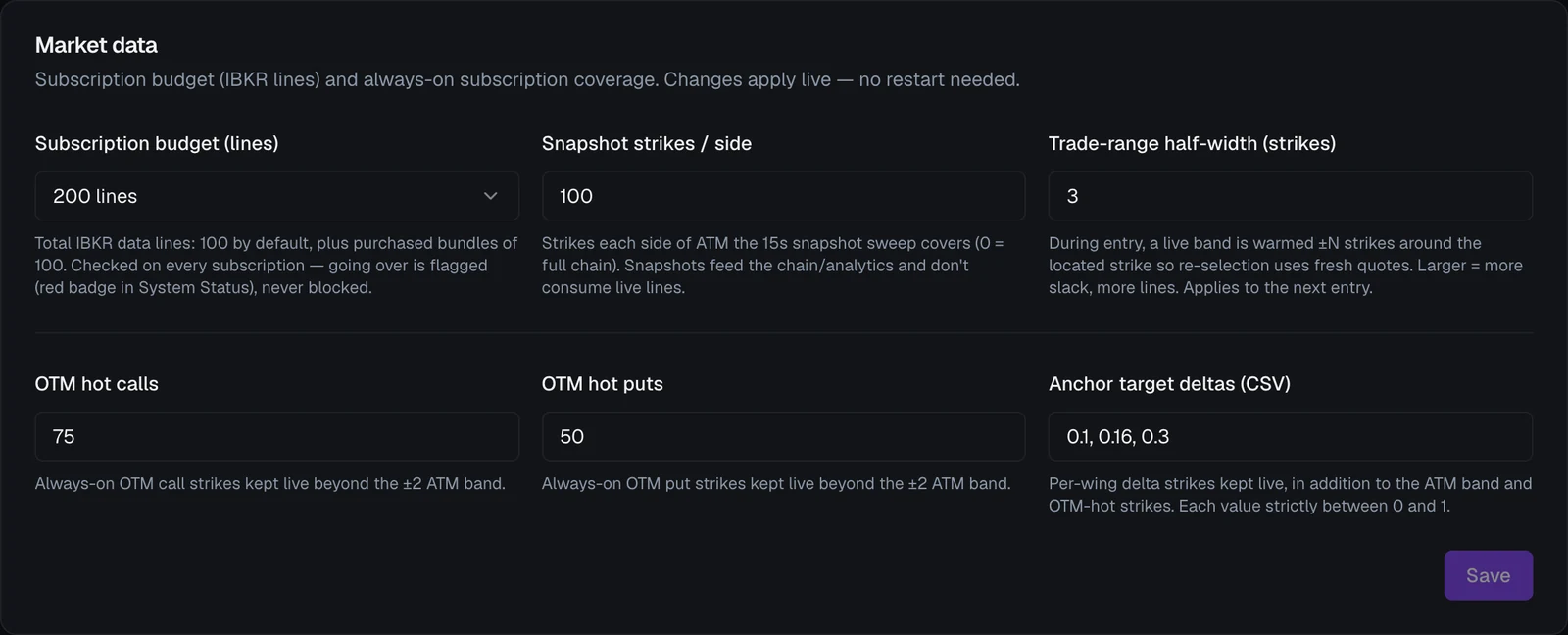
Open Settings → Market data. Everything in this section applies live, no restart needed. Press Save to apply your changes. The section has three parts.
Your line budget
- Subscription budget (lines) — how many live lines your IBKR account allows, in bundles of 100. Set this to match your real allowance. It is the ceiling everything else spends against, and it also sets how fast VolNinja may request data from IBKR, so a bigger budget means fresher data as well as more of it.
Live coverage
Streaming quotes, spent out of the budget above. Your open positions and working orders always stream; they aren't configurable.
- Always stream option chains — one switch per underlying, off by default. Normally an underlying's chain streams only while a template or position needs it (see When an underlying's chain is active). Switch it on to keep that underlying's same-day chain active regardless, so you can watch its options chain and strangle prices with no template running. An always-on chain spends lines like any other active one: its ATM band, its delta anchors, and its share of hot OTM bands if that switch is on too.
- Keep hot OTM bands — one switch per underlying, on by default. Every active chain first gets its ATM band and delta anchors; whatever budget is left over goes to the underlyings with this switch on, which use it to stream strikes further out of the money. That gives you live, tick-by-tick quotes on the out-of-the-money strikes 0DTE trades usually sit on, instead of a snapshot up to 15 seconds old. You don't set the width yourself: VolNinja fills outward until the budget runs out, keeping the put wing wider than the call wing, and stops a wing early once premium there is too thin to be worth a line. It also holds back enough lines for one entry, so opening a trade never has to evict live coverage. With the switch off, those strikes still show, on snapshot quotes.
- Anchor target deltas (CSV) — the per-wing deltas to keep live, comma-separated and each strictly between 0 and 1 (for example
0.10, 0.16, 0.30). After the at-the-money band, these are next in line for live lines. - Trade-range half-width (strikes) — how many strikes around the target VolNinja warms with live quotes during entry. Larger gives more slack for re-selection, but uses more lines while a trade is opening. It widens on its own when the target sits far out in the wings, and a change applies from the next entry.
Every underlying keeps its ATM band and its delta anchors whatever the switches say; turning one off only stops it widening, and its spare lines go to the underlyings still switched on. Turn one off when you'd rather concentrate coverage on the underlying you trade most.
Snapshot coverage
The 15-second sweep behind the chain and analytics. It uses no live lines; it spends request budget instead.
- Chain coverage (% of spot) — how far each side of the money the sweep reaches, as a share of spot. Wider means more of the chain visible in analytics, at no line cost, but more of your request budget. One percentage covers the same ground on every underlying, which a strike count cannot: the same 120 strikes is 7.8% of SPX and 15.6% of XSP. The readout under the field shows how many strikes your setting works out to on each underlying right now. Sampling is dense near the money and sparser in the wings.
- Wing premium floor (ticks) — the sweep stops walking out a wing once option prices there fall below this many minimum price ticks, so the coverage above is a ceiling rather than a promise. Set it to 0 to never stop early. It's counted in ticks rather than dollars because the minimum tick differs by underlying (a nickel is one tick on SPX but five on SPY); the readout under the field shows what your count works out to on each. Strikes your templates target are always covered regardless.
Important
The budget setting does not grant you more lines; it only tells VolNinja how many your IBKR account has. If you set it higher than Interactive Brokers allows, the extra subscriptions won't stream. Set it to your true allowance, and raise your real allowance at IBKR (below) if you need more.
Extending the 100-line limit
The 100-line ceiling is Interactive Brokers', not VolNinja's, and IBKR lets you raise it two ways:
- Quote Booster Packs — each pack adds 100 lines for a monthly fee, and you can add up to 10 per account (1,000 extra lines).
- Account size — IBKR also grants more lines automatically as your account equity and commissions grow.
Check or change your allowance in Client Portal → Market Data Subscriptions at Interactive Brokers, then set VolNinja's Subscription budget (lines) to match the new number. For the current thresholds and Booster Pack pricing, see IBKR's Market Data Lines documentation.
Tip
You don't need more lines to trade well: 100 covers the ATM band, your positions, and your usual delta strikes. Consider extending only if you run many strategies at once, want wide OTM coverage live, or regularly see Data: Thinned or Data: Degraded in System Status. When in doubt, trim your always-on coverage in Settings before paying for more lines.
System Status and data health
Open System Status (the status dropdown at the top of the app) and find the Market Data Service block. Besides the connection state, it shows:
- Data: a health pill, the one-glance answer to "is my market data keeping up?". Hover it for a one-line explanation.
- Full — all coverage is live and on schedule.
- Thinned — some extra strikes fell back to snapshots, so previews refresh more slowly. Trading is unaffected: entries and exits still use live data.
- Degraded — data is refreshing more slowly than it should, because the line budget or the snapshot sweep is under pressure. Trading is still unaffected.
- Impaired — market data itself has a problem. Check the IBKR connection, a pacing penalty (below), or your market-data subscriptions at IBKR.
- N/your-limit subs — your live-line usage. High usage is normal, as explained above.
- Request pace — how many requests per second VolNinja is sending IBKR. If IBKR has slowed you down for sending too many, this line says penalized (IBKR pacing); that clears when the connection is re-established. Line refusals since the last check are counted here too.
- Sweeps — keeping up, or how many parts of the chain the snapshot sweep is behind on.
- A small chip per chain (for example SPX·10-01) with a colored dot. Hover a chip to see how many lines that chain has and how many anchor strikes are live. A red dot means your IBKR account isn't entitled to that chain's data.
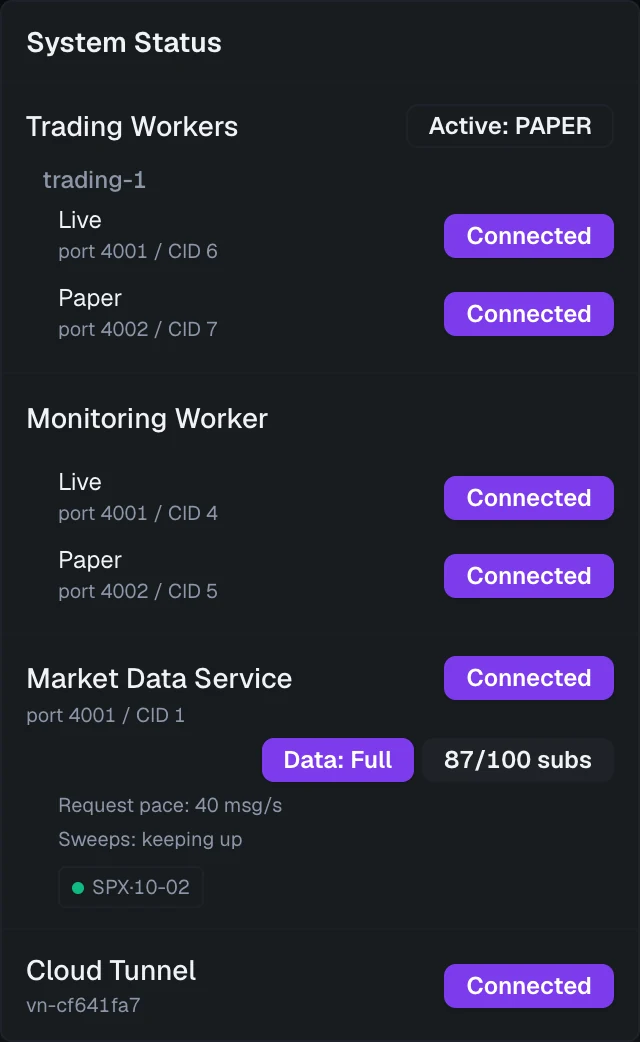
When the market-data connection is down, the block says so instead, and coverage, pacing and sweeps are paused until it reconnects.
Where you see it all
- The Options Chain shows, per strike, whether it's streaming live, and how old a snapshot quote is.
- System Status shows your data health, your total line usage, and your market-data connection.
- Settings → Market data is where you tune what stays live, and where you record your real IBKR line budget.
If you are setting up your IBKR connection for the first time, see Connecting IBKR.