
Paper vs Live — Trading Safely
VolNinja can trade in two modes: Paper (your Interactive Brokers paper-trading account, no real money) and LIVE (your real account, real money). Both route real orders to IBKR; the difference is which account they reach. Switch between them deliberately, and know what the switch controls, so you never fire real money by accident.
The mode switch
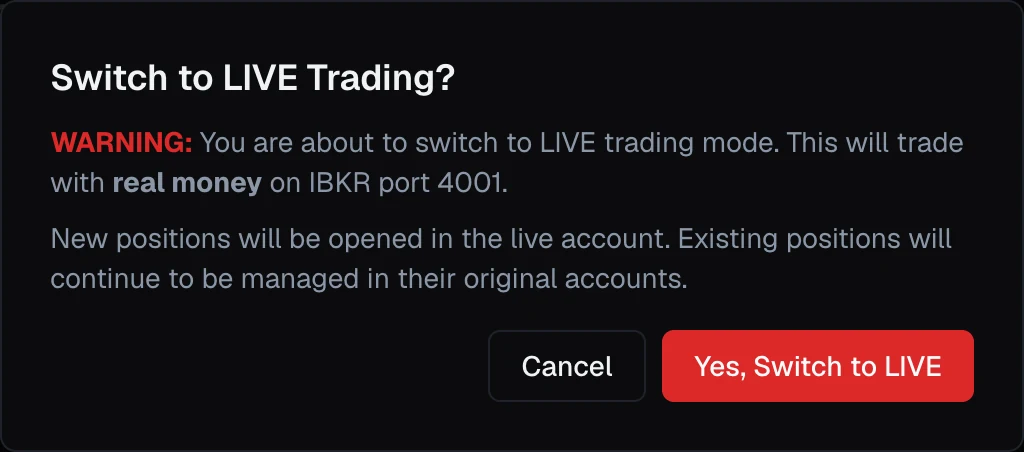
The Paper / LIVE switch at the top of every screen shows your current mode. In LIVE, a red REAL MONEY badge appears next to it, your cue that anything you do now uses real funds. Flipping the switch always opens a confirmation dialog first; nothing changes until you confirm.
On a phone the full switch doesn't fit, so the header shows a compact Paper or Live pill instead (red, with a warning icon, in Live). Tapping it opens the same confirmation.
What the switch controls — and what it doesn't
The header switch is not a master power switch. It controls two things:
- Your manual actions. When you run a template or open a position by hand, it goes to whichever mode the switch is showing right now.
- What you see. The Dashboard, positions, account balances, and running strategies you're looking at are for the current mode. Flip the switch and the view swaps to the other mode.
It does not do these things:
- It does not move or close your existing positions. VolNinja keeps managing each position in the account it was opened in. Switching your view to Paper leaves your live positions running.
- It does not pause your automations. VolNinja runs Paper and Live side by side, and a strategy that's enabled for Live keeps trading live even while you're viewing Paper.
- There is no single "stop everything" button. To stand down, disable the automation and close the positions yourself (below). Flipping to Paper is not enough.
Warning
Switching the header to Paper does not stop live trading. VolNinja keeps managing your live positions, and live-enabled strategies keep running in the background. Never submit test orders while you are in live mode.
Switching modes
Click the switch and confirm. The change takes effect immediately for your next manual action and for what you're viewing. The confirmation spells it out: new positions open in the account you're switching to, while existing positions stay managed in their original account.
The mode is remembered per browser. Every tab of the same browser follows the switch together, but another browser, or your phone, keeps its own choice, so you can be looking at Paper on your laptop while your phone shows Live. A browser that has never had a mode set starts in Paper.
Automations run per mode
The header switch does not govern strategies. Each has its own Paper and Live toggles (on its card on the Strategies screen). That's deliberate: you can let a strategy run live around the clock while you flip your view to Paper to try something out. It also means enabling a strategy for Live is the real "go live" decision. See Running a strategy and Strategies overview.
Important
A strategy's Live toggle is what puts it on real money, independently of the header switch. Before you enable Live on any automation, be sure its rules do what you expect. To take a live automation offline, turn off its Live toggle; to flatten exposure, close the positions.
Trading safely
Three habits keep the line between practice and real money clean:
- Glance at the switch (and the REAL MONEY badge) before every manual action, on every device you trade from, since each one remembers its own mode. That single check catches most mode mistakes.
- Prove new templates and strategies in Paper first. Run them, watch how they fill and how their rules behave, and only flip to Live (or enable a strategy's Live toggle) once you trust them.
- Remember the split: the switch is your view and your manual actions; your strategies' Paper/Live toggles are what's live in the background.
If something looks wrong (orders you didn't expect, or a mode that won't change), see Troubleshooting. For where trading-related options do and don't live, see Settings.