
Rules & Conditions
Almost everything VolNinja does automatically runs on the same idea: a rule. A management rule that takes profit on a position, a template rule that closes a leg, a strategy rule that opens a new trade: they are all built the same way. A rule watches for something to become true, and when it does, it acts.
The mechanics are identical everywhere, so this page is the only place they are spelled out. The articles for template rules, strategy rules, and a position's own rules cover only what is special about each place, and point back here for how conditions are written. Two companion pages hold the detail: Formulas & Steps Tables for typed formulas and stepped values, and the Condition Field Reference for every field you can watch.
What a rule is
Every rule has an action (what it does) and conditions that decide when. A rule whose action closes a position or a leg has one more part, and it changes what the conditions are for:
- Action — what happens: close the position, close or roll a leg, open a template, set a variable. Which actions exist depends on where the rule lives, and each rule article covers its own.
- P&L target (closing rules only) — a single profit or loss level. This is the part that can rest at your broker as a real order, so it keeps working if VolNinja is closed. It is optional.
- Conditions — with no target, these are the trigger: the action runs when they are met. With a target, they become the gate: the target does the firing, and the conditions decide when its order is allowed to stand. The editor says which, heading them When these conditions are met or While these conditions hold.
The distinction matters more than it looks. Close when profit reaches 50% can be written two ways, and they are not equivalent: as a target of profit 50%, it rests as a limit order at your broker; as a condition on the P&L % field, it runs in the app and rests nothing, so it cannot fire while VolNinja is off. Put price levels in the target and everything else (times, the underlying, other legs) in the conditions. See Where rules run for what rests and why.
Rules that don't close anything (strategy rules, a roll, opening a template) have no target, so for them the conditions are simply the trigger.
A condition, piece by piece
A single condition compares one thing to another:
a field · an operator · a value (or another field)
- The field is what you're watching: the position's P&L, the underlying price, a leg's delta, the time of day, and many more. Fields come from a searchable catalog, grouped by category, so you pick from what is available rather than typing anything by hand. The Condition Field Reference lists them all, and where each one is offered.
- The operator depends on the field's type. Numbers offer greater than, less than, equal, and so on; times offer after, before, and at; yes/no fields offer is and is not.
- The value is what you compare against: a fixed number, a time, a yes/no. You can also compare one field to another field (optionally scaled by a multiplier), which is how you say things like "the mark is below 30% of the entry credit."
The conditions list
Every rule's conditions start from the same list, headed When ALL of these are true. The rows are combined with and: the rule acts only when every condition holds.
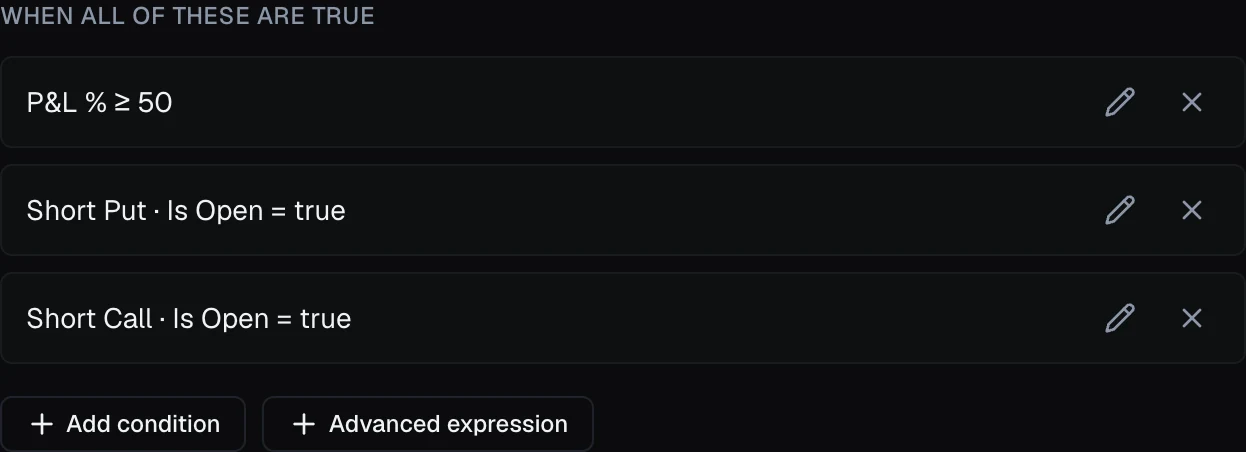
An empty list means the rule has nothing to fire on, and a rule with no conditions never acts. The list says so (No conditions — never matches), and a strategy's rule card reads Never — no conditions, so an unfinished rule is harmless. The one exception is a closing rule that carries a P&L target: there the list reads No conditions — the P&L target alone decides, because the target is the trigger. A closing rule with neither a target nor a condition can't be saved; the editor asks you to add one.
Two buttons sit below the list:
- Add condition — the simple editor, for a single straightforward comparison.
- Add formula — type the condition yourself, for anything that needs or, grouping, functions, or arithmetic.
Whichever you use, each finished condition shows up as a plain-language row you can click to edit or remove. You never have to read raw code to know what a rule will do.
Simple conditions
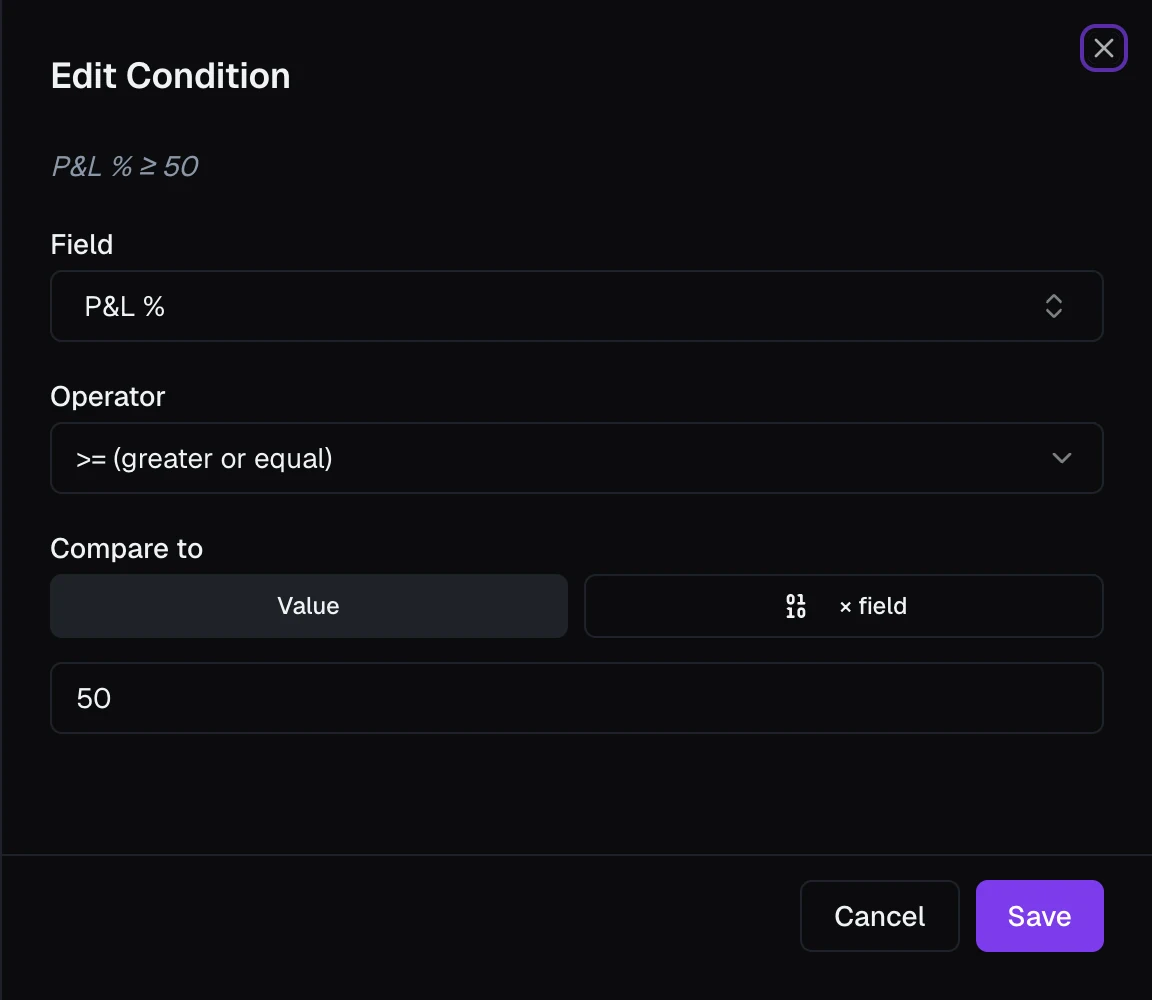
Add condition opens the Edit Condition panel. You choose a Field, pick an Operator, and set what to Compare to:
- Value — a plain number, time, or yes/no.
- × field — another field, with an optional multiplier.
- By steps (number fields only) — a value that changes in steps as another field moves, such as a cap that rises through the morning. See Steps tables.
A live summary at the top restates your condition in words as you build it, and Save adds it to the list as a single readable row.
This covers the large majority of real rules (take-profit levels, stop-losses, time-of-day exits), each one a single comparison.
Tip
The italic line at the top of the editor is a live preview: it rewrites your condition in plain English as you change the field, operator, or value. If the preview reads the way you'd say it out loud, the condition is right.
Formula conditions
Some conditions can't be reduced to one row combined with and. When you need "either this or that," grouped logic, not, or arithmetic on either side, use Add formula to open the Formula condition panel and type it, for example engine.minutes >= 1 and (strategy.day_pnl > -2000 or my.next_entry_min = 1). Names complete as you type, and the line under the box shows what you wrote in plain words, or points at the mistake; Save condition waits until it is valid.
How to type a condition (brackets, not, times, text) is covered once, in Formulas & Steps Tables.
Tip
On a rule that closes a position, its conditions don't decide whether it can rest as a real order at your broker, where it fires even if VolNinja is closed; its P&L target does. A rule with a target becomes one resting order, and its conditions, however you join them with and / or, only decide when that order is armed. A rule with no target runs in the app. See Where rules run.
Using variables in conditions
Inside a strategy, the field catalog also includes the strategy's variables (values you define and maintain yourself, shared global ones, and live aggregates over your positions) right alongside the market and position fields. A condition can then compare a live value to a threshold you control and can change in one place, rather than editing every rule. See Strategy Variables.
How often rules are checked
Rules are checked on a steady clock, every second by default. You can slow that down for each mode, Live and Paper separately, under Settings → Trading → Rule evaluation. One setting covers both your strategies' rules and the exit rules on your open positions, so a slower cadence delays stops and take-profits by up to that long, and a condition that is true only for a moment can be missed entirely. Slower costs less CPU. See Settings.
A target resting at your broker as a real order is the exception: the broker watches it continuously, whatever the cadence.
The action
Conditions decide when; the action decides what. The available actions differ by where the rule lives, so they are covered in the surface-specific articles: template rules, strategy rules, and a position's rules.
Warning
A rule acts on its own. When its conditions are met, it runs its action without asking. If that action opens or closes a trade and you're in LIVE mode, it moves real money. Read a rule's conditions carefully before you rely on it, and see Paper vs live.