
Technical Indicators
A rule can watch more than prices and P&L. It can watch a technical indicator: a moving average, RSI, VWAP, MACD, or the Stochastic oscillator, computed from the price history of SPX, XSP, SPY, QQQ, or VIX. "Enter when SPX's 5-minute close crosses above its 20-period EMA" or "only take the trade while VIX is below its daily average" are each a single condition.
Indicators work in template rules, a position's own rules, strategy rules, calculated variables, and a strategy's Multiplier (typed in its formula). They are not offered in a Close positions filter or an aggregate, which look at positions rather than the market. How a condition is built in general (field, operator, value) is in Rules & Conditions; this page covers what is particular to indicators.
Adding an indicator to a condition
In the Edit Condition panel, open the field list and pick an indicator under the Indicators chip. For a single bar's open, high, low, or close, pick Price bar under Underlying instead. The line at the bottom of the list says what the highlighted indicator measures and how much history it needs.
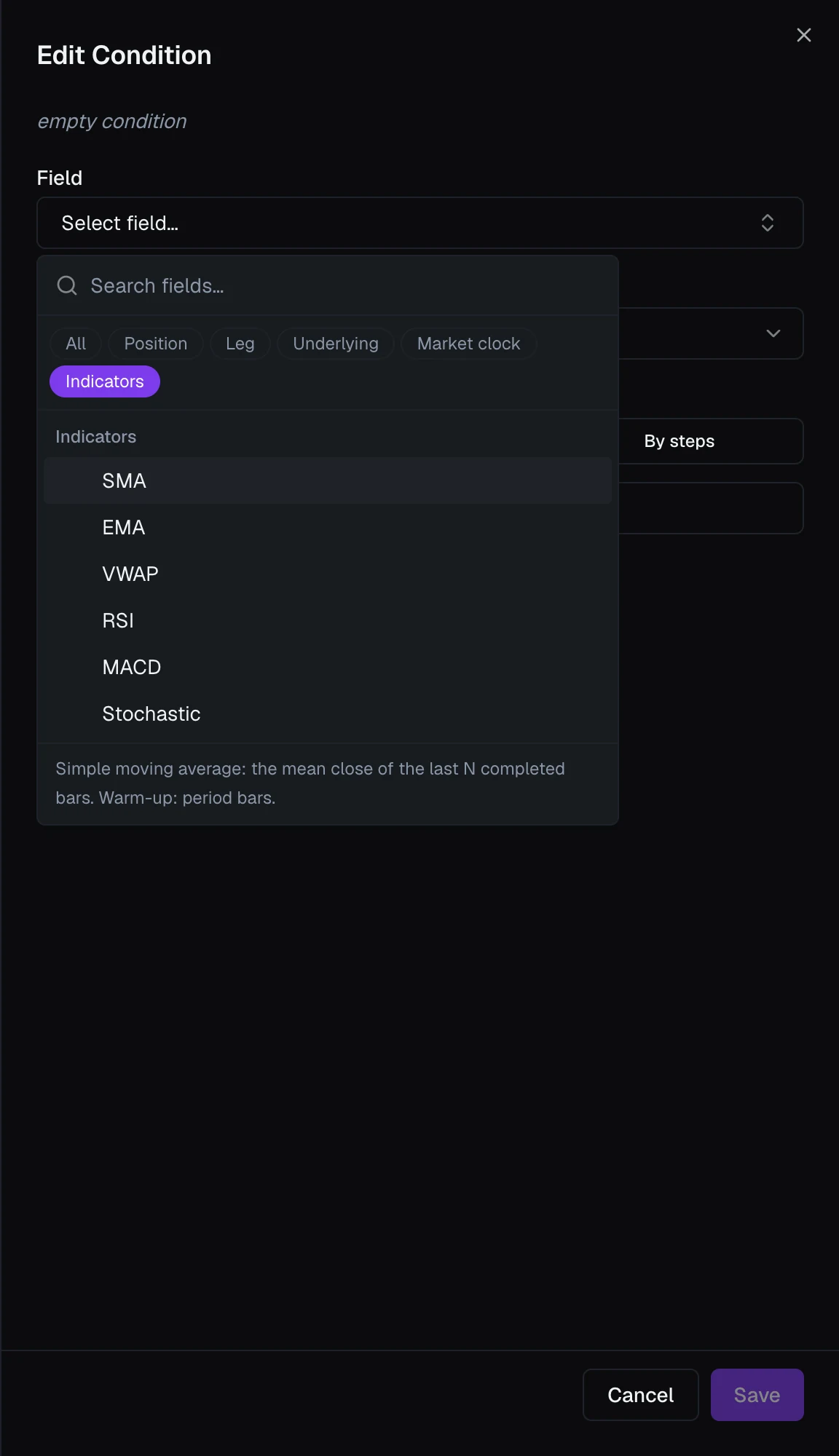
Once you pick one, the panel asks for a few more things:
- Symbol — which instrument to read. In a template, This position's underlying follows whatever the position trades, so one template works on SPX and SPY alike.
- Timeframe — the bar size: 1m, 5m, 15m, 30m, 1h, or 1d.
- The indicator's own settings, such as Period, already filled in with the usual defaults (RSI 14, MACD 12 / 26 / 9).
- Output — which line to read, for an indicator that draws more than one (MACD's Signal, the Stochastic's D), or which price of a Price bar.
- Bars ago — 0 for the latest bar, 1 for the one before it, up to 20.
Then compare it to a number (SPX 5m RSI(14) > 70) or to another indicator (SPX 5m EMA(9) ≥ EMA(21)), typed in Compare to as ema(SPX, 5m, period = 21). The + beside that box inserts an indicator with the same symbol and timeframe as the left side, so a cross compares like with like. The line under the settings says how much history the indicator needs. What each indicator measures, with its lines and defaults, is in the Condition Field Reference; to type one into a formula instead, see Indicators in a formula.
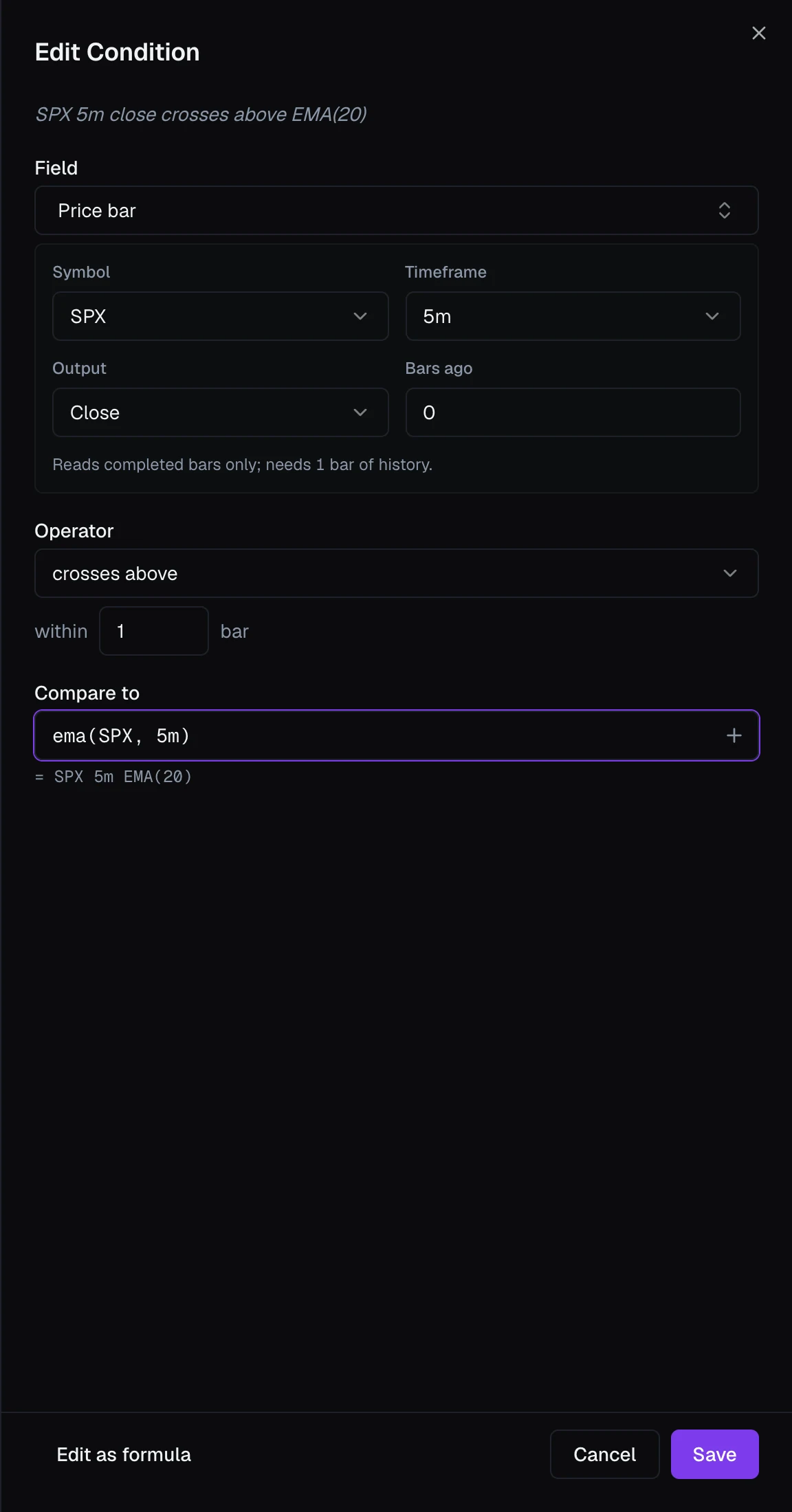
Completed bars only
Indicators read completed bars only. An RSI on 5-minute bars changes when each 5-minute bar closes, never partway through one. That has two consequences:
- What fired your rule stays true afterwards. The value a rule acted on is the value the chart shows once the bar is done. A spike that reverses inside a bar never fires anything, so you never get an order with no visible reason.
- There is a delay of up to one bar. A 5-minute indicator can be up to five minutes behind the market, an hourly one up to an hour.
When the delay matters, use a shorter timeframe, or compare a live field against the indicator: pick the field, then type or insert the indicator in Compare to. Last above SPX daily SMA(20) is checked every time rules are checked, against an average that holds still until the next day, which is usually what "price above its 20-day average" means anyway.
Bars follow the regular session. They are counted from the 9:30 AM ET open, so the hourly bars run 9:30, 10:30 and so on, and the last one of the day is 30 minutes long. Outside regular hours an intraday indicator keeps reading the last bars of the session, unchanged until the next open.
Daily bars
On 1d, the latest completed bar is the last finished day: yesterday's while today trades. That is why the summary of a daily condition says so, as in SPX daily high (last session) or SPX daily close (3 sessions ago).
This makes the daily Price bar and the Underlying session fields different things:
| You want | Use |
|---|---|
| Today's high or low so far | Session High / Session Low |
| Yesterday's high or low, or any earlier day's | Price bar, 1d, with Bars ago |
| Yesterday's close | Previous Close, or the daily Price bar's close: the same number while today trades |
Warm-up and unknown values
An indicator needs some history before it has a value. A 20-period SMA needs 20 bars; an EMA needs three times its period, so that its starting point no longer affects it. The panel shows the requirement under the settings (needs 3 × period bars of history).
VolNinja collects that history for you, fetching past bars from your broker in the background. Short indicators on intraday bars are ready soon after the first start; a long one, such as a 200-period average on hourly or daily bars, needs months of history and takes longer. Until an indicator has what it needs, and whenever its data is missing, it reads unknown, and a rule waiting on it waits rather than acting on a guess. During regular hours, an intraday indicator also reads unknown if no new 1-minute bar has arrived for two minutes, which means the price feed has stopped.
Important
Reading a symbol keeps it streaming. If an indicator reads a symbol nothing else is watching, such as VIX, or SPY when you trade SPX, that symbol takes one of your market data lines while rules use it, leaving one fewer for option quotes. See Market Data & Subscriptions.
Crosses
With an indicator on the left of a condition, the operator list adds crosses above and crosses below. SPX 5m close crosses above EMA(20) is true on the bar where the close went from at or below the EMA to above it.
- The other side is a number (RSI crosses above 30) or another indicator on the same symbol and timeframe.
- A live field such as Last can't be in a cross, because it has no bars to compare. For price, use Price bar with Close.
- A cross normally counts only on the bar it happened. Set within to a higher number, up to 20, to count a cross on any of that many recent bars, which helps when you combine it with other conditions that may not line up on the same bar.
A cross is an event, not a state, so VolNinja makes sure each one does what you meant exactly once:
- A cross fires a rule once. After the rule acts on a cross, that cross reads false for that rule (and, on a template rule, for that position), even while it is still inside its within window. One cross never opens two trades.
- An action a cross started gets finished. If the rule can't complete right away, such as an exit whose order is still working, it keeps at it until done instead of waiting for another cross.
- An intraday cross ends with its session. Once the session closes it no longer counts, so a cross on the last bar of the day doesn't fire the next morning. A daily cross stays true for its within days.
- Pausing or disabling a rule drops a cross it hasn't acted on. When you turn the rule back on, it waits for a new one.
Crosses and P&L targets
A closing rule can carry a P&L target, and its conditions decide when the target may fire. Put a cross in those conditions and the two have to be true at the same moment: the rule closes only if P&L reaches the target while the cross still counts, on its bar or within its window. Such a rule also runs in the app, not at your broker, because a cross lasts too briefly to rest an order under.
Warning
A target gated on a cross is not "turn the target on after the cross". Loss 100%, gated on RSI crosses below 30 closes only if the loss reaches 100% during the bars right after the cross, which is rarely, so most of the time it protects nothing. If you mean "after the move, keep the stop armed", gate the target on a level instead, such as close below EMA(20), which stays true after the cross and lets the stop rest at your broker.
What you probably mean, and how to write it:
| Intent | Write it as |
|---|---|
| Take profit at 50%, but only while momentum is fading | Target Profit 50%, gated on a level: RSI < 50, or close below EMA(20). It rests at your broker while the gate holds. |
| Exit on the cross, but only if the trade is in profit | No target. Conditions: RSI crosses below 70 and P&L % ≥ 20. The app closes on the cross. |
| Exit on the cross, whatever the P&L | No target. Condition: the cross alone. |
VWAP
VWAP is the volume-weighted average price since the session opened, and it starts over every session, so it is offered on intraday timeframes only. It needs trading volume, which an index doesn't have: on SPX and XSP it is computed from the S&P 500 futures' volume, and VIX has no VWAP. While a rule reads VWAP on SPX or XSP, VolNinja streams the futures during regular hours, which takes one market data line.
Indicators elsewhere
- In a formula — type
rsi(SPX, 5m),sma(SPX, 1d, 20), orclose(SPX, 5m) crosses above ema(SPX, 5m, 20) within 3 bars. See Formulas & Steps Tables. - In a calculated variable — a calculated variable can hold an indicator's value, such as a daily SMA your rules compare against. It can't hold a cross: a cross fires a rule, so it belongs in a rule's conditions.
- In the Risk Lab — rule trigger probabilities include indicator and cross rules: the Lab builds bars along each simulated path, starting from the indicator's real recent history. See Risk Lab.